Consent flow
As soon as you have obtained a valid JWT token, you are ready to make your first call for orchestrating a PSD2 session. A PSD2 session follows a standard sequence of calls, from retrieving the available banks, to creating a consent for the end user to retrieving the data. Technical specifications for the endpoints are available under the 'API references' tab. Note that depending on your use case, not all endpoints are relevant, and the most common flow of calls is described below.
Retrieving the available banks
GET /providers
Now that you possess a valid JWT, the next step in the consent flow is to retrieve a list of bank providers (i.e. "providers") which are available for end customers to connect bank accounts from.
The call will return a structured list of all available banks. Key attributes are the code - which is generally a 4-letter representation of the different providers - and the bank icon which can be used to automatically fill a frontend component with the bank's logo.
Find the list of all available bank providers under the 'Account Information' tab in the navigation menu.
Bank coverage[
{
"lastUpdated": "2021-03-15T07:53:48.921Z",
"code": "DP-TESTBANK",
"providerId": "DP-TESTBANK",
"active": true,
"regions": [
"NL"
],
"icon": "https://751015778420-assets.s3.amazonaws.com/static/images/mock-logo.png",
"created": "2021-03-15T07:53:48.921Z",
"colour": "#ffd400",
"mock": true,
"region": "NL",
"name": "Test bank"
},
{},
{}
]
On sandbox, opening the providerUrl in a browser will show a list of scenarios containing mock data. These can be selected to load various datasets containing mock transaction data.
You can use the output to reflect a list of banks in the frontend, so the user can indicate which bank to connect:
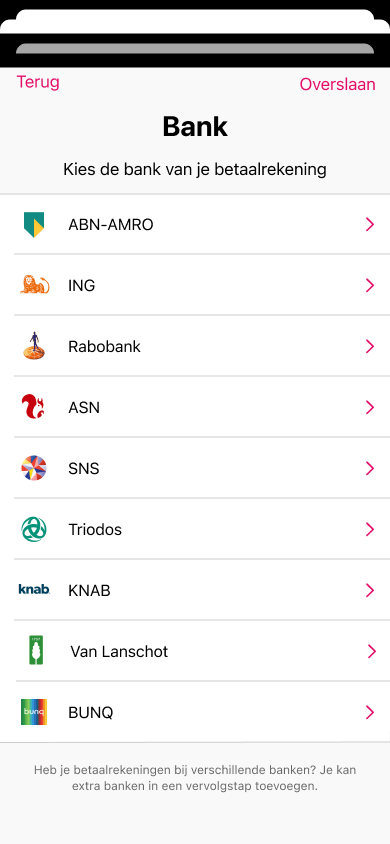
After connecting one account, the frontend should always the user to choose ‘connect another account’ and return back to the list of banks. This allows end users to connect multiple accounts.
Before offering a bank in this list, you can optionally check whether it is currently healthy enough to start a new journey against, via the Status API's GET /providers endpoint — see Tracking the full journey: the Status component (#tracking-the-full-journey-the-status-component) below.
Creating a consent
POST /consents
From the list or providers, a user is now able to select for which provider they want to connect a bank account. This provides the input for the next call in the consent flow, which is the creation of a new consent with the selected provider.
The POST call will return a consentId which shows that the consent was created succesfully, as well as the providerUrl which is the URL which a frontend app can use to redirect the user to the banking app.
{
    "provider":"INGB",
    "type":"AIS",
    "region":"NL",
    "redirectUrl":"[redirectUrl]"
}
API request body to POST /consents
In a live setting, you provide a redirectUrl that is specific to your application. This tells the banking app where to return after the user has authenticated the consent. In a production environment, you should provide us with the redirectUrl (or multiple Urls) so we can add them to your configuration. In the sandbox environment, the following redirectUrl can be used in the call: https://localhost/authToken
The API will provide confirmation of consent creation with the following call. The providerUrl can be opened by the frontend to redirect the user to the corresponding bank environment.
{
  "id": "239b82-35349348-3293a28-53e34"
  "providerUrl": "https://psd2.callback.ing.nl/redirect"
}
API response
The redirectUrls for your live applications require whitelisting on our end. This is handled by your account manager.
Retrieving the account information
GET /accounts
Now that the consent has been authenticated, our system will start retrieving information from the bank account. The first information that is generally returned by the bank is the account information, containing the name of the account holder, the account number (e.g. IBAN) and balance(s) of the bank account.
This information can be obtained by calling the accounts endpoint. An example of the API response body is shown below.
 {
  "data": [
    {
      "consentedServices": [
        "BALANCES",
        "TRANSACTIONS",
        "DETAILS"
      ],
      "currency": "EUR",
      "providerConsentId": "DP-TESTBANK_PersoonlijkeRekening_2023-08-01",
      "providerAccountId": "DP-TESTBANK_PersoonlijkeRekening_2023-08-01_Account2",
      "tenantId": "default",
      "tenantUserId": "23423",
      "consentType": "AIS",
      "name": "JJ Jackson eo PM Jones",
      "aisStatus": "NOT_APPLICABLE",
      "customerAccountNumber": "NL98DEMO7266528333",
      "displayName": "JJ Jackson eo PM Jones",
      "balances": [
        {
          "lastChangeDateTime": "2023-08-01T00:00:00.000Z",
          "currency": "EUR",
          "balanceType": "current",
          "balanceAmount": "3021.41"
        }
      ],
      "consentStatus": "TERMINATED_BY_TPP",
      "active": false,
      "userId": "default_default_23423",
      "correlationId": "723440cb-fec1-4588-9881-13d8dbc8bc58",
      "provider": "DP-TESTBANK",
      "region": "NL",
      "consentCreated": "2023-09-08T12:17:51.336Z",
      "tenantAppId": "default",
      "lastUpdated": "2023-09-08T12:24:34.952Z",
      "consentId": "7e5fa0d4-d7dd-4193-9d05-1c8a9be4175a",
      "accountId": "f8a001d4-aebd-43fd-902a-fb3834109b0c",
      "created": "2023-09-04T12:53:52.481Z",
      "iban": "NL98DEMO7266528333",
      "consentValidUntil": "2028-09-07T17:30:31.599Z",
      "type": "iban"
    },
    {
      "consentedServices": [
        "BALANCES",
        "TRANSACTIONS",
        "DETAILS"
      ],
      "currency": "EUR",
      "providerConsentId": "DP-TESTBANK_PersoonlijkeRekening_2023-08-01",
      "providerAccountId": "DP-TESTBANK_PersoonlijkeRekening_2023-08-01_Account1",
      "tenantId": "default",
      "tenantUserId": "23423",
      "consentType": "AIS",
      "name": "Hr JJ Jackson",
      "aisStatus": "NOT_APPLICABLE",
      "customerAccountNumber": "NL28DEMO1234567989",
      "displayName": "Hr JJ Jackson",
      "balances": [
        {
          "lastChangeDateTime": "2023-08-01T00:00:00.000Z",
          "currency": "EUR",
          "balanceType": "current",
          "balanceAmount": "221.39"
        }
      ],
      "consentStatus": "TERMINATED_BY_TPP",
      "active": false,
      "userId": "default_default_23423",
      "correlationId": "723440cb-fec1-4588-9881-13d8dbc8bc58",
      "provider": "DP-TESTBANK",
      "region": "NL",
      "consentCreated": "2023-09-08T12:17:51.336Z",
      "tenantAppId": "default",
      "lastUpdated": "2023-09-08T12:24:34.961Z",
      "consentId": "7e5fa0d4-d7dd-4193-9d05-1c8a9be4175a",
      "accountId": "5f2aa298-acfd-410e-84fe-4ad95df407a5",
      "created": "2023-09-04T12:53:52.414Z",
      "iban": "NL28DEMO1234567989",
      "consentValidUntil": "2028-09-07T17:30:31.599Z",
      "type": "iban"
    }
  ]
}
It is recommended to use the customerAccountNumber attribute rather than the iban attribute for referencing the account number. The iban property is not available for accounts which are not a checking account, like savings accounts or creditcards. The customerAccountNumber is always populated, either with the iban when it is available, or otherwise with the non-IBAN account number.
The type attribute indicates the type of bank account.
Polling the status of retrieval
GET /enrichment/processing-status
The moment a consent is authenticated, our system will asynchronously retrieve the transactions from the bank and enrich them with e.g. with categories and information regarding their periodicity.
The status endpoint will return an array of accounts and provide either RETRIEVING, PROCESSING, COMPLETED or ERROR. This endpoint can be polled continuously until all accounts are set to COMPLETED, which tells the frontend application it is okay to continue.
[
  {
    "accountId": "f8a001d4-aebd-43fd-902a-fb3834109b0c",
    "lastUpdated": "2023-09-04T12:54:01.571Z",
    "status": "COMPLETED"
  },
  {
    "accountId": "5f2aa298-acfd-410e-84fe-4ad95df407a5",
    "lastUpdated": "2023-09-04T12:53:58.874Z",
    "status": "COMPLETED"
  }
]
It is recommended to poll every 1-2 seconds. During a split second, the GET call may return an empty object. This just means the account data has not started retrieving yet, and polling should the endpoint just continue until the accounts appear. If after 30 seconds the response is still empty, or an account remains set to RETRIEVING, it is recommended to interpret this as an error - see also error handling.
Tracking the full journey: the Status component
Enrichment/processing-status above tells you when account retrieval for the current session is done. The Status component gives the bigger picture: a single, read-only view of a user's entire open banking journey, from the first consent through to insights being generated, and of the current health of the banks (providers) involved. It doesn't trigger or influence any processing — it only reflects what has already happened.
Two questions it answers
-
Per user: How far along is a specific end-user's open banking journey?
-
Per provider (bank): Is a bank currently healthy enough to start a new journey against?
User journey (per user)
Each end-user's journey follows a hierarchy: user → sessions → consents (bank authorizations) → accounts → transaction sets. Each level has its own status. The user's overall status is always only as far along as the least-progressed active entity — if the user adds a new consent, the status drops back until that consent has been processed too.
Two things to keep in mind:
-
Status values are not a fixed set. New values may be added without prior notice, so your integration should handle unknown values gracefully.
-
The API is eventually consistent. There may be a short delay between an action occurring and the corresponding status becoming visible.
Provider health (per bank)
Alongside the per-user journey, the component computes a health score per bank every 15 minutes, based on how many critical steps recently succeeded or failed. This results in a public label (HEALTHY, DEGRADED, INSUFFICIENT_DATA) plus a 0–100 health score, so you can check whether a bank is currently working well before offering it in the bank list at the start of the flow (see Retrieving the available banks (#retrieving-the-available-banks)).
Learn more
The full technical API reference — endpoints, response schemas, all status values — is available in the Status API registry:
Status API on Scalar (https://registry.scalar.com/ockto/apis/status-api/latest)
Retrieving the transactions
GET /enrichment/transactions
Calling the /enrichment/transactions endpoint will return the bank transactions provided by the end user, enriched with valuable attributes such as categories and recurring information. The ais/transactions endpoint returns the same, but without enrichment attributes.
 {
  "data": [
    {
      "valueDate": "2019-01-01",
      "debtorAccount": {
        "counterparty": "MyCurrent",
        "currency": "EUR",
        "iban": "NL00ABNA0000000001"
      },
      "tenantId": "default",
      "status": "booked",
      "creditorAccount": {
        "counterparty": "MySavings",
        "currency": "EUR",
        "iban": "NL00ABNA0000000002"
      },
      "bookingDate": "2019-01-01",
      "tenantUserId": "218e057f-6552-4b2c-8ed6-46fcc42fb300",
      "ownAccount": true,
      "userId": "default_default_218e057f-6552-4b2c-8ed6-46fcc42fb300",
      "provider": "DP-SIMPLE",
      "region": "NL",
      "paymentType": "ScheduledPayment",
      "tenantAppId": "default",
      "lastUpdated": "2023-08-29T11:32:32.607Z",
      "accountId": "183b64e1-00a0-4a89-8861-4f4a49c3fa85",
      "transactionAmount": {
        "amount": "100",
        "currency": "EUR"
      },
      "recurring": true,
      "recurringFrequency": "monthly",
      "recurringStreakId": "9a24e04a-84d9-4ae3-a36c-01494d2d537d",
      "ownAccount": true,
      "category": "Savings"
  ],
  "pagination": {}
}
The API response returns the transaction data in a pagination way to limit its size. How to handle pagination properly is explained in more detail here:
Transaction paginationOptionally, a startDate and/or endDate can be specified to receive only the transaction data within the specified range. Note that this does not affect what we retrieve from the bank itself, only what data is provided in the API. The maximum transaction history can be configured for your use cases by the account manager.
The way we present the transaction data follows a bank standard format. This means that we differentiate a debtor and a creditor for each transaction. Depending on whether the transaction is coming into the account, or going out of the account, the debtor or the creditor is the 'counterparty' of the transaction.
Example
A payment transaction is done at an Albert Heijn with a transactionAmount of -10. In this case 'Albert Heijn' will be the creditorAccount, and the accountholder will be the debtorAccount.
Besides the JSON format, it is also possible to request the transactions in human readable formats, by calling the /enrichment/documents endpoint as explained in the Enrichment API specification.
Retrieving a list of recurring streaks
GET /enrichment/recurring-streaks
Besides the list of transactions, it is also possible to request a list of all recurring streaks of transactions. These are defined as a group of transactions that belong to eachother and repeat in a specific pattern. The recurring frequencies that we currently support are listed under 'Transaction enrichment' in the navigation menu.
Each streak also contains an array of categories that each underlying transaction has. In most cases, this means the streak will have one single category assigned to it.
 [
  {
    "streakId": "aacc1c92-0b56-4cee-ba0d-f14ea15a1e45",
    "userId": "default_default_23423",
    "accountId": "f8a001d4-aebd-43fd-902a-fb3834109b0c",
    "manualCreate": false,
    "manualUpdate": false,
    "manualActive": false,
    "frequency": "WEEKLY",
    "transactionIds": [
      "c96d93b4-87cd-56b1-a993-065212dda260",
      "f2f945be-9a46-59cc-8d88-4b5f41edcc1c",
      "b4990758-91ac-5f54-b00b-e261d3780e24",
      "b4990758-91ac-5f54-b00b-e261d3780e24",
      "b991b4ba-095e-5ad6-ae60-9e9ebd1a46a6",
      "a0bb054c-d115-56fa-9494-ef600eb2d132",
      "b8606f36-40db-526b-acd6-a2c25acc4478"
    ],
    "created": "2023-09-04T12:53:55.002Z",
    "lastUpdated": "2023-09-04T12:54:01.136Z",
    "active": false,
    "name": "Hr JJ Jackson",
    "expectedAmount": 1000,
    "currency": "EUR",
    "firstTransactionDate": "2023-06-11",
    "lastTransactionDate": "2023-08-01",
    "expectedDate": "2023-08-07",
    "ownAccountType": "ACTIVE"
  },
  {
    "streakId": "4e4fc1f0-20da-4f1a-9e60-076cb5ac5515",
    "userId": "default_default_23423",
    "accountId": "5f2aa298-acfd-410e-84fe-4ad95df407a5",
    "manualCreate": false,
    "manualUpdate": false,
    "manualActive": false,
    "frequency": "MONTHLY",
    "transactionIds": [
      "325926ac-da59-5b2f-ae49-6a24444283cb",
      "39bb1c0f-cca5-5363-9214-189c985ea2f4"
    ],
    "created": "2023-09-04T12:53:57.241Z",
    "lastUpdated": "2023-09-04T12:53:57.241Z",
    "active": true,
    "name": "Coolblue B.V.",
    "expectedAmount": 2043.25,
    "currency": "EUR",
    "firstTransactionDate": "2023-06-11",
    "lastTransactionDate": "2023-07-11",
    "expectedDate": "2023-09-11",
    "ownAccountType": "NONE"
  }
]