Informing end users about PSD2
When end users connect their bank account(s) through Ockto, you are in control of most of the customer journey. Additionally, a small part of the journey takes place in the environment of their own bank, namely to complete the consent flow. There, the end user sees names and texts that neither you nor Ockto control.
In most use cases, Ockto's PSD2 licence is leveraged. As a result, 'Ockto B.V.' is the legal entity that retrieves the data on behalf of the end user. This means the name Ockto will (have to) appear to the end user in two places:
- 'Ockto B.V.' is shown in the consent flow of the bank. This cannot be influenced by you or by Ockto.
- A GDPR consent is required from the end user to facilitate the exchange of the retrieved data from Ockto to you, the receiving organisation.
If you do not use Ockto's PSD2 licence but bring your own, this will not apply. See also:
Bring your own PSD2 license /getting-started/account-information/bring-your-own-psd2-licenseFor the reasons above, properly informing the end user before they start their PSD2 journey is important to prevent confusion, drop-off or incomplete data. This section lists what we strongly recommend telling the end user before they start the Ockto PSD2 journey.
GDPR consent
Required by Ockto
The only hard requirement that Ockto imposes on your customer journey is showing a GDPR consent to the end user. This consent from the end user is needed for a compliant exchange of the data Ockto retrieved on their behalf, between Ockto and your organisation.
The following requirements apply:
- The GDPR consent has to be an active check mark, checked by the end user before they can continue;
- The consent text shown must contain at least the text provided below;
- The links to Ockto's privacy statement and terms and conditions are added as URL links for the end user to visit, as provided below in Dutch and English;
- Ockto retains the right to review the customer journey before go-live in order to confirm compliance, and appreciates your cooperation.
Do you have a reason to deviate from our default consent texts? Your account manager can inquire with our compliance department about what is possible within the boundaries of compliance.
Dutch
Ik ga akkoord met de algemene voorwaarden van Ockto en ik heb kennisgenomen van het
privacy statement van Ockto. Ik begrijp dat Ockto mijn gegevens deelt met {{COMPANY_NAME}}
English
I agree to the terms and conditions of Ockto and I have read the privacy statement of Ockto. I understand that Ockto shares my data with {{COMPANY_NAME}}.
Informational best practices
Apart from the required consent above, Ockto does not impose requirements on your customer journey. However, there are best practices we recommend for properly informing the end user. These best practices are listed below, supported by a visual example.
Strongly recommended
- Introduce Ockto as your trusted partner, and explain why the name Ockto may appear during the customer journey:
- Ockto is a trusted partner that provides us with services for the secure retrieval of banking information via PSD2.
- Ockto is licensed as an Account Information Service Provider and regulated by the Dutch national banking authority (DNB).
- The PSD2 request for access to the bank account comes from Ockto B.V., not from your organisation.
- 'Ockto B.V.' will be listed in the end user's banking app or online banking environment as the party receiving the data.
- State clearly how many months of bank transaction history Ockto retrieves on their behalf:
- Mention a concrete period, for example "the past
[X] months", rather than a vague description. - Place this period next to the explanation about the bank's standard text, so the difference is immediately clear.
- Mention a concrete period, for example "the past
- State clearly which type of data is passed on between Ockto and you:
- Whereas Ockto is required to obtain the actual bank transactions from the bank, in many cases, for data minimisation purposes, the data you receive under the GDPR consent of the end user is more limited, or aggregated to a higher, less sensitive level.
- Especially if you do not collect any transaction data from Ockto, this helps to build trust with the end user.
- Explain that the consent flow of some banks may offer conflicting information regarding access to the data:
- Some banks, primarily ING, show a fixed text regarding the permission requested from the end user, which suggests that access is granted for a period of 18 months. This is technically possible under the PSD2 regulation, but Ockto only accesses the information once and actively breaks the consent connection with the bank account after retrieval.
- Explain that multiple banks can, and in most cases must, be connected for a full overview:
- End users with accounts at more than one bank can connect all of them to create a consolidated overview of their finances.
- In many cases they even must do so: for example when their salary is paid into another account, or when rent or fixed costs are debited from another account.
- Mention that an incomplete connection may result in the end user not being approved for credit, or in a slower onboarding process.
An example of a screen that informs the end user before the PSD2 journey could look like this:
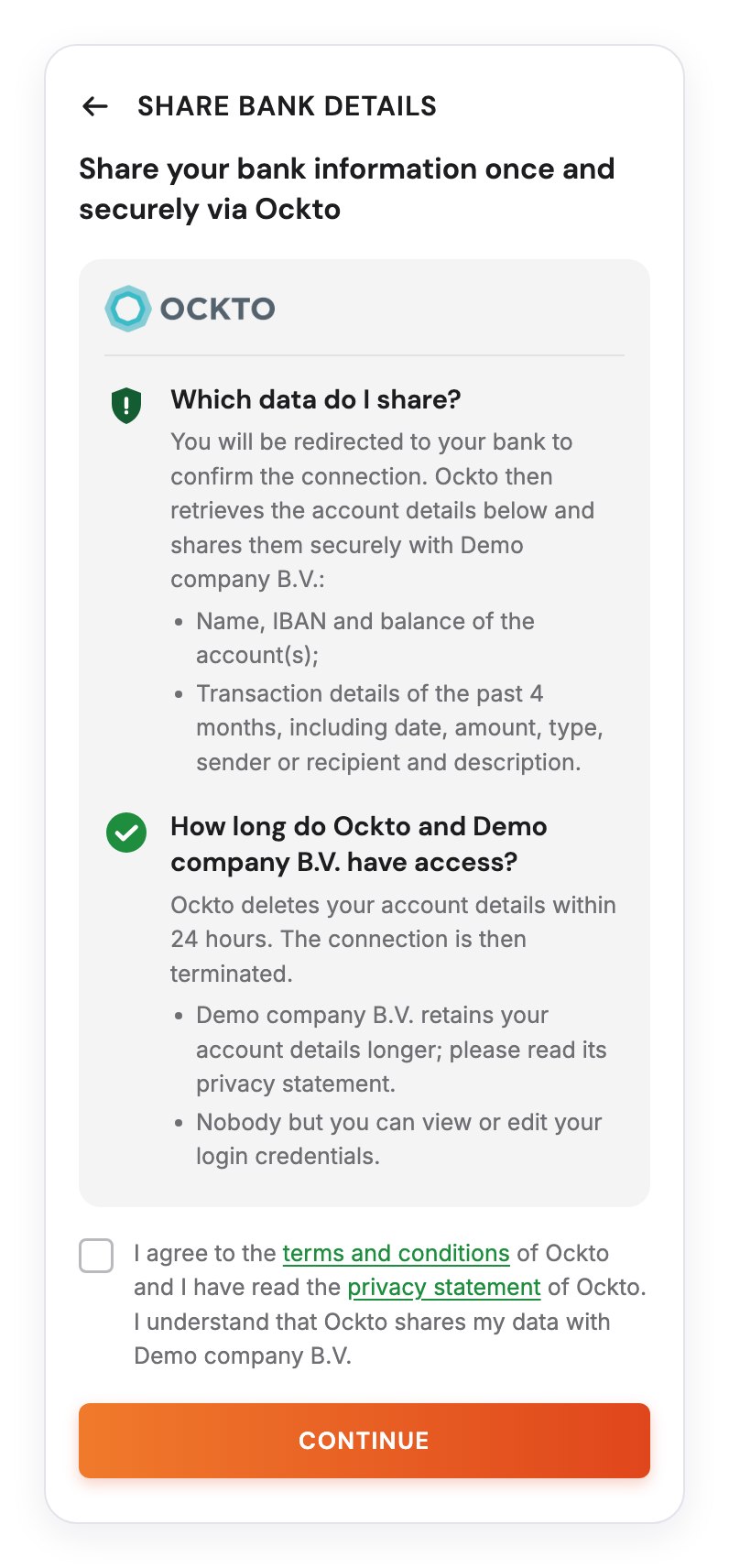
Example of a screen informing the end user before the PSD2 journey
Other best practices
- Explain that Ockto can only read data and can never make payments.
- Explain that the end user logs in through their own bank's trusted environment, and that Ockto never sees their login credentials.
- Ask the end user to have their login method at hand (banking app, card reader or identifier), to prevent drop-off halfway through.
- State how long the consent remains valid. In nearly all cases, the consent is 'one-off' and does not remain active after the initial retrieval of data.
- Explain whether joint or business accounts must also be connected, and who needs to log in for them.
- State the purpose of the data (e.g. the mortgage application), with whom it is shared and how long it is retained.
- Explain the alternative if the end user's bank is not supported, for example uploading bank statements manually.
Example text for end users
You can use the text below as a starting point on the page where the end user starts the Ockto session. Replace [X] with the number of months that is retrieved.
English
You give Ockto one-time consent to retrieve the transactions of your bank account(s) for the past [X] months. Ockto will then be listed in your banking app under granted consents. Some banks, such as ING, show a standard text suggesting the connection stays active for several months. Ockto, however, retrieves the [X] months mentioned only once and actively ends the consent afterwards. Do you have multiple bank accounts, for example an account your salary is paid into or your rent is debited from? Please connect those as well. Ockto can only view your data and can never make payments.
Nederlands
U geeft Ockto eenmalig toestemming om de transacties van uw bankrekening(en) van de afgelopen [X] maanden op te halen. Ockto staat daarna in uw bank-app bij de verleende toestemmingen. Bij sommige banken, zoals ING, ziet u een standaardtekst die suggereert dat de koppeling een langere periode blijft bestaan. Ockto haalt echter alleen eenmalig de genoemde [X] maanden op en verbreekt daarna actief de koppeling. Heeft u meerdere bankrekeningen, bijvoorbeeld een rekening waar uw salaris op binnenkomt of waar uw huur van afgaat? Koppel die dan ook. Ockto kan alleen meekijken en nooit betalingen doen.
Your implementation manager can help you place this information in your customer journey, for example on the landing page where the QR code or deeplink is shown.